Batch Assign Report
The Batch Assign Report section allows you to batch assign report to caller.
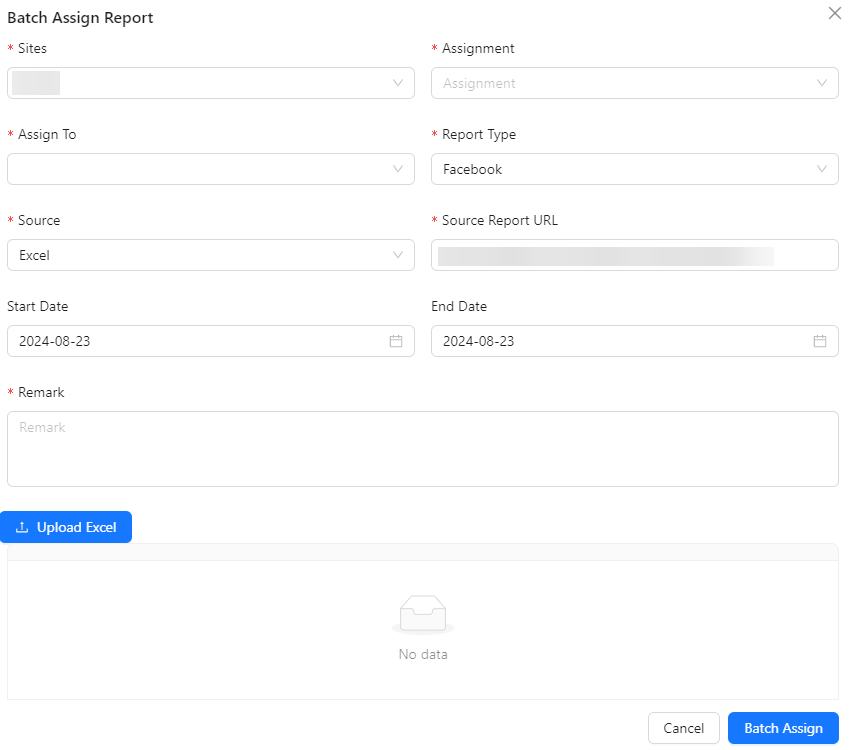
- Sites: Select the site associated with the task assignment.
- Assignment: Specify the task or set of tasks to be assigned.
- Assign To: Choose the user to whom the tasks will be assigned.
- Report Type: Select the type of report for the task assignment.
- Deposit: Tasks related to deposit reports.
- Withdrawal: Tasks related to withdrawal reports.
- Registration: Tasks related to registration reports.
- Facebook: Tasks related to Facebook reports.
- Others: Any other report types not listed.
- Source: Choose the source of the report data.
- Report: Data is sourced from a predefined report.
- Excel: Data is sourced from an Excel file.
- Others: Data is sourced from other types of files or inputs.
- Source Report URL: Provide the URL of the source report.
- Start Date: The start date for the task assignment.
- End Date: The end date for the task assignment.
- Remark: Add any additional notes or remarks related to the task.
- Upload Excel Button: Allows the upload of an Excel file for task assignment.