Create / Edit Hot Game
The Create / Edit Hot Game section allows you to add and edit hot game entries to the system.
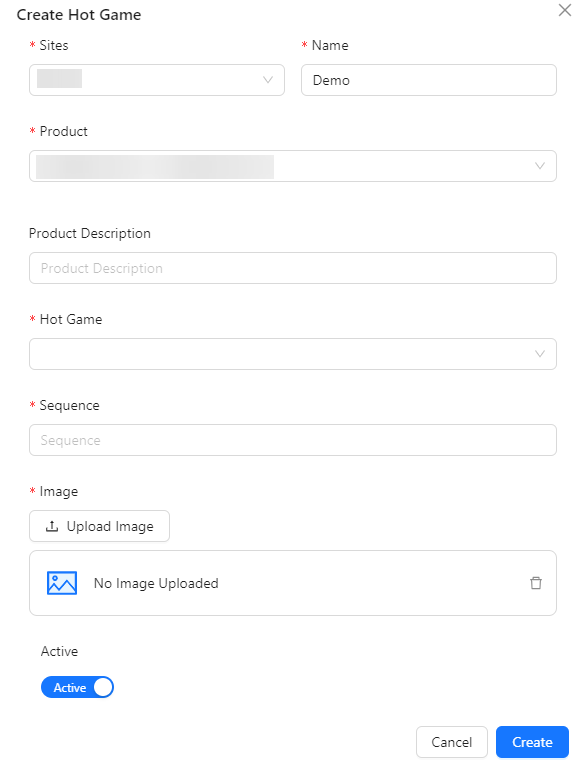
- Sites: Select the site or platform where the hot game will be available.
- Name: Enter the name of the hot game.
- Product: This field will appear after selecting a site and allows you to choose the associated product.
- Product Description: This field will appear after selecting a site and provides the description of the selected product.
- Hot Game: This field will appear after selecting a product and allows you to select the hot game.
- Game Image: Displays the image of the selected hot game. This field is view-only.
- Game Category: Displays the category of the hot game after it is selected. This field is disabled and auto-filled based on the hot game selection.
- Game Code: Displays the unique code of the hot game after it is selected. This field is disabled and auto-filled based on the hot game selection.
- Sequence: Specify the order or sequence of the hot game in the list.
- Image: Upload an additional image related to the hot game.
- Active: Indicate whether the hot game is active or not.