Daily Checkin Configuration
The Daily Check-in Configuration section provides an overview and customization of the daily check-in process, including reward tokens, deposit requirements, and Lucky Wheel settings.
Select Site

- Select Site: Select the site where you want to configure the daily check-in settings.
Daily Checkin Configuration
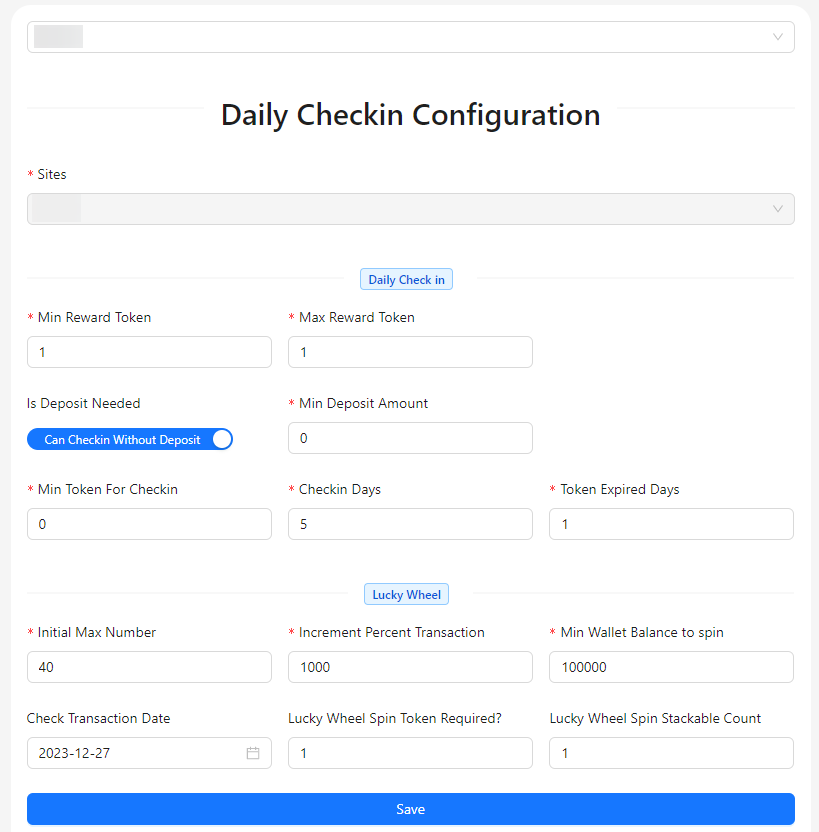
Daily Check-In Creation Fields
- Sites: This is a disabled field that auto-assigns the site based on your selection.
- Min Reward Token: Specify the minimum amount of reward tokens a user can receive for checking in.
- Max Reward Token: Define the maximum amount of reward tokens a user can receive for checking in.
- Is Deposit Needed?: Indicate whether a deposit is required to participate in the daily check-in.
- Min Deposit Amount: Set the minimum deposit amount required for participation, if applicable.
- Min Token For Checkin: Define the minimum number of tokens needed to qualify for a check-in reward.
- Checkin Days: Specify the number of days users need to check in to qualify for rewards.
- Token Expired Days: Set the number of days after which tokens will expire if not used.
- Initial Max Number: Set the initial maximum number of spins for the Lucky Wheel related to daily check-ins.
- Increment Percent Transaction: Define the percentage increase in transaction amount that affects the Lucky Wheel spins.
- Min Wallet Balance to Spin: Specify the minimum wallet balance required to spin the Lucky Wheel.
- Check Transaction Date: Determine if the transaction date should be checked before allowing a Lucky Wheel spin.
- Spin Token Required?: Indicate whether tokens are required to spin the Lucky Wheel.
- Spin Stackable Count: Set the number of times Lucky Wheel spins can be stacked or accumulated.