PWA Configuration
The PWA Configuration section allows you to manage and configure settings for Progressive Web Apps (PWAs). This feature is designed to help you optimize PWA functionality, including setting up service workers, configuring caching strategies, and enhancing the overall user experience of your web application.
View PWA Configuration
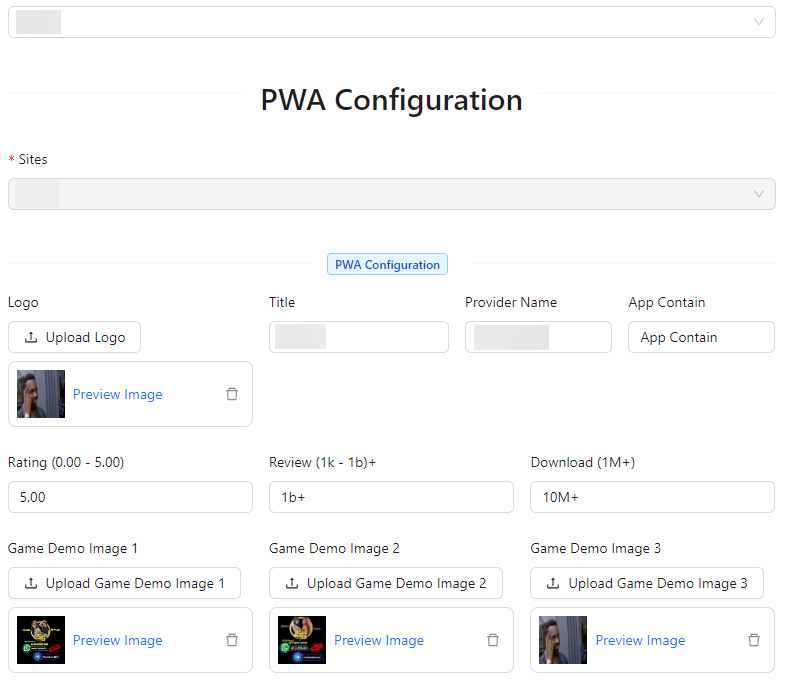

- Logo: Upload the logo for the Progressive Web App.
- Title: Enter the title of the PWA.
- Provider Name: Input the name of the provider or developer of the PWA.
- App Contain: Specify the content or features included in the PWA.
- Rating (0.00 - 5.00): Enter the rating for the PWA, ranging from 0.00 to 5.00.
- Review (1k - 1b)+: Provide the number of reviews the PWA has, ranging from 1,000 to over 1 billion.
- Download (1M+): Enter the number of downloads, starting from 1 million.
- Game Demo Image 1: Upload the first demo image for the PWA.
- Game Demo Image 2: Upload the second demo image for the PWA.
- Game Demo Image 3: Upload the third demo image for the PWA.
- About This Description: Provide a description about the PWA.
- Tag: Add tags to describe the PWA (e.g., ["tag1", "tag2"]).